The Cornell Note-Taking Method: How to Set Up the Page and Turn Notes into Review

The Cornell method is a way to take lecture notes so they are ready for review. You split the page into three parts: a wide column for notes during the lecture, a narrow column for questions and key words that you fill in after, and a box at the bottom to sum up the page in your own words. To review, you cover the wide column and answer the questions from memory.
What is the Cornell method?
Walter Pauk, an education professor at Cornell University, developed it in the 1950s and popularized it in his book on studying in college. The idea is simple: most students write a lot in lectures and never go back, or reread their notes again and again. With Cornell notes, the page is built from the start so you can test yourself with it.
How to set up the page
Why...?
Key words
| Part | Where | What you write | When |
|---|---|---|---|
| Notes column | The wide part of the page | Ideas, definitions and examples, in short phrases | During the lecture |
| Cue column | A narrow column, about a third of the width | A question or key word next to each chunk | After the lecture |
| Summary box | A few lines at the bottom | Two or three sentences in your own words | After the lecture |
The cue column goes on the left, so each question sits right before the chunk it asks about. (If you take notes in a right-to-left language such as Hebrew or Arabic, flip it and put the cue column on the right.)
The five steps
- Record. During the lecture, write what matters in the wide column, in short phrases. Not every word the lecturer says.
- Reduce. After the lecture, ideally the same day, write a question or key word in the narrow column next to each chunk. Next to a definition, "what is it?"; next to an example, "when is this used?".
- Recite. Cover the wide column, read each question, and answer out loud from memory. Only then look.
- Reflect. In the bottom box, write two or three sentences: the main idea of the page and how it connects to what you learned before.
- Review. Go back over the pages several times across the semester, not only before the exam, again with the wide column covered.

A Cornell notes example, and a printable template
Here is a filled-in page after a lecture on retrieval practice: questions in the cue column on the left, the notes from the lecture on the right, and a summary box at the bottom. To review, cover the notes column and try to answer the questions.
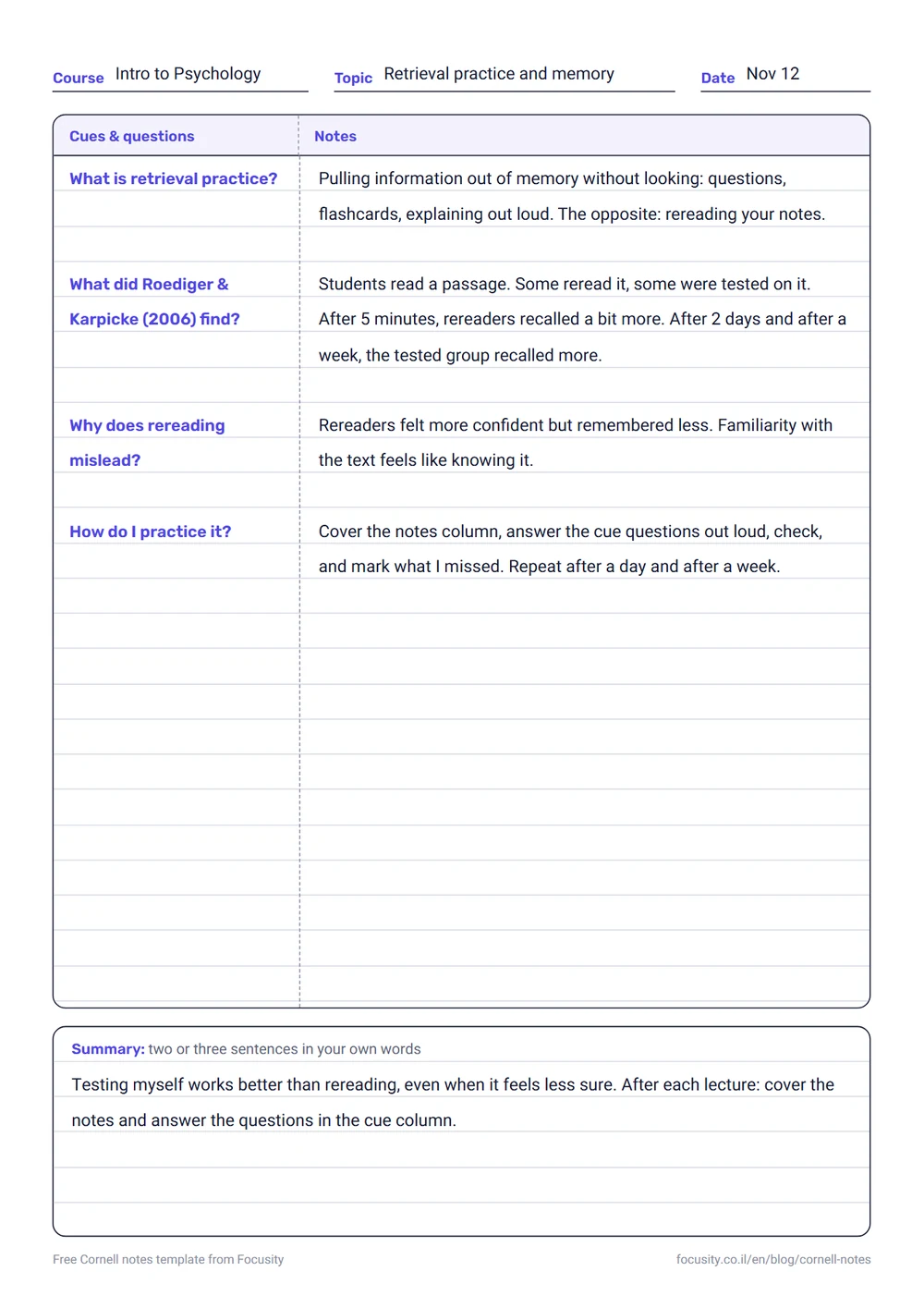
Ready to start? Here is a free blank A4 template. Print a few copies and keep them in your binder.
Why it works
There isn't much research on the Cornell method itself, but the third step, covering and answering from memory, rests on one of the most robust findings in learning research: testing yourself leaves far more in memory than rereading the same material. Roediger and Karpicke, 2006. The cue column is really a set of flashcards already built into your notes. If you skip that step and only reread the page, the method loses most of its value.
Cornell notes on a computer or tablet
- On a tablet: in apps like Goodnotes and Notability you can download or make a Cornell page template and write on it by hand.
- In Word or Google Docs: a two-column table with a merged row at the bottom.
- In Notion: two columns and a text block underneath. You can hide the notes column in a toggle block to quiz yourself.
When it fits, and when less so
The Cornell method fits courses with many concepts, definitions and ideas, such as psychology, law, history and biology. In problem-solving courses such as math and physics, most of the learning happens while solving, not while taking notes, and the cue column is mainly useful for formulas and theorems.

Focusity doesn't take your notes, but it can plan the step that is easiest to skip, the review: add a review task with a date for each course, and the app books time for it in your free hours. Free.
Build my plan — freeFrequently asked questions
What is the Cornell note-taking method?
A lecture note-taking method developed by Walter Pauk of Cornell University in the 1950s. You split the page into a wide column for notes during the lecture, a narrow column for questions and key words that you fill in afterward, and a box at the bottom to sum up the page in your own words. To review, you cover the wide column and answer the questions from memory.
How do you set up a Cornell notes page?
Draw a vertical line about a third of the way across the page to make a narrow cue column and a wide notes column, and leave a few lines at the bottom for a summary box. The cue column goes on the left; in a right-to-left language such as Hebrew, put it on the right.
How do I take notes in a lecture?
Before the lecture, split the page into three parts. During it, write what matters in the wide column, in short phrases rather than every word. After the lecture, ideally the same day, write a question or keyword next to each chunk in the narrow column, and two or three sentences in your own words at the bottom. To review, cover the notes and answer the questions.
Is there a free printable Cornell notes template?
Yes. This article has a free A4 template to download as a PDF, in English and in Hebrew with the cue column on the right. Print as many copies as you need, or rule the same layout into a regular notebook.
Does the Cornell method actually work?
There isn't much research on the method itself. But the step where you cover your notes and answer the cue questions from memory rests on one of the most robust findings in learning research: testing yourself leaves more in memory than rereading. If you skip that step, the method loses most of its value.
Can I use Cornell notes on a tablet or computer?
Yes. In Goodnotes and Notability you can work from a Cornell page template and write by hand. In Word or Google Docs a two-column table with a merged bottom row is enough, and in Notion two columns plus a toggle block to hide your notes while you quiz yourself.
Which courses is the Cornell method best for?
Mostly courses with many concepts, definitions and ideas, such as psychology, law, history and biology. In problem-solving courses such as math and physics it is less useful, mainly for formulas and theorems.
Good notes, and time to review them
Focusity builds a weekly study plan inside your free time, including review time for each course. Free on iPhone, Android and the web.
Build my plan — free