
The Best Revision Timetable Apps, Compared (2026)
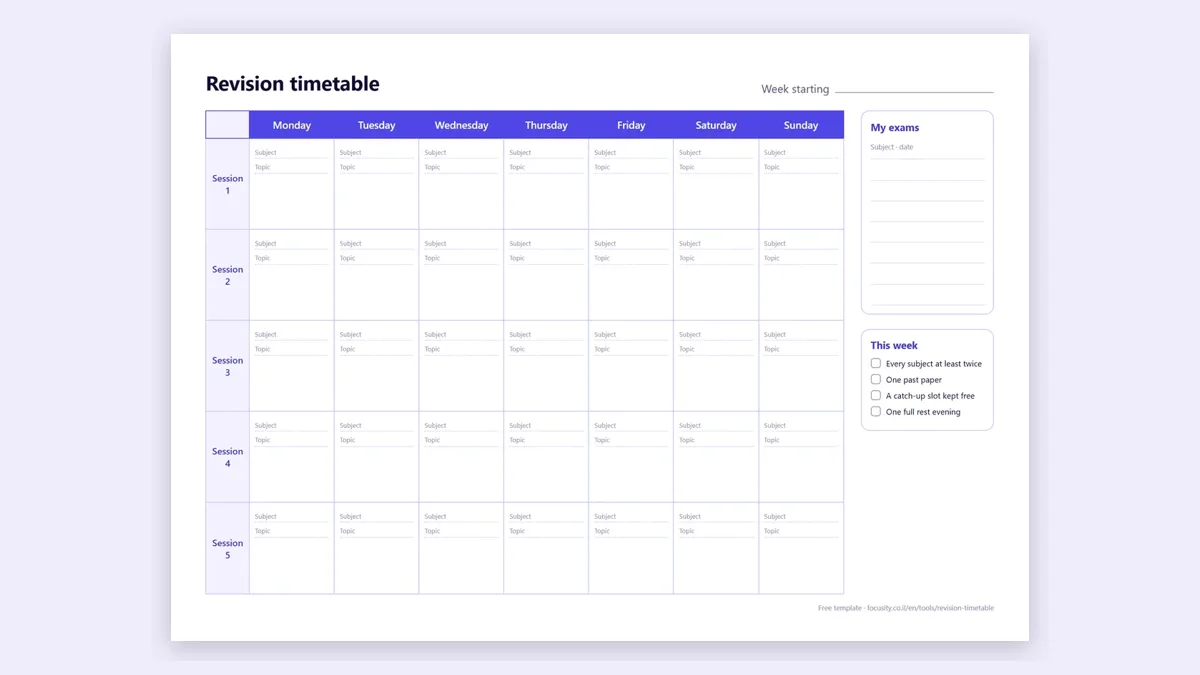
The short answer: for GCSEs and A levels, Adapt builds the timetable from your exam dates and comes with exam-board content, and Get Revising and Save My Exams do it for free. If you also have a school or university timetable to plan around, Focusity, StudySmarter and MyStudyLife build the plan around it. For one big exam with a fixed amount of material, Todait splits it into a daily amount. And if you just want a printable plan without an app, our free revision timetable maker takes about a minute.
Disclosure: we make Focusity, one of the apps on this list. That's why every other app here gets a line on what it does better than us, and Focusity gets a line on where it falls short. We compared the others from their official sites and UK App Store and Google Play listings on November 11, 2026. Prices are UK prices and can differ in your app store. We have not used every paid plan ourselves, so try the free version first. App and product names belong to their owners, who are not affiliated with Focusity.
The 8 apps at a glance
| App | Builds the timetable for you | Made for | Platforms | Cost |
|---|---|---|---|---|
| Adapt | Yes, from exam dates and availability | GCSE, iGCSE, A level | iPhone, Android | Free with ads; Premium from £9.99/mo |
| Get Revising | Yes, around the times you block out | GCSE, A level, IB, university | Web | Free |
| Save My Exams | Yes, from subjects, schedule and exam dates | GCSE, iGCSE, A level, IB | Web | Free planner, with an account |
| Seneca | A weekly plan from subjects, target grades and schedule | GCSE, A level | Web, iPhone, Android | Free |
| Focusity | Yes, from exam dates and your class timetable | School and university | iPhone, Android, web | Free; optional Premium |
| StudySmarter | Yes, spreads chapters to the exam date | Mainly university, also GCSE and A level | Web, iPhone, Android | Free; Premium £79.99/yr |
| MyStudyLife | Yes, with its Scout assistant | School and university | Web, iPhone, Android | Free, limited; MyStudyLife+ £4.99/mo |
| Todait | Daily amounts, not clock times | Any big exam | iPhone only | 2 plans free; £4.99/mo |
Which revision timetable app is best for what?
| What you need | Best pick | Why |
|---|---|---|
| GCSE or A level revision with exam-board content | Adapt | Plan and topics in one app, built from your exam dates |
| A free timetable on a computer | Get Revising or Save My Exams | Both build the plan for free on the web |
| Revision around lessons, a job or a two-week timetable | Focusity | Places sessions in the free hours your timetable leaves |
| University exams | Focusity or StudySmarter | Both count back from each exam date |
| One exam, a fixed amount of material | Todait | Turns "1,200 pages by exam day" into a daily amount |
| A printable timetable, no app and no sign-up | Our free maker | Exam dates in, a day-by-day plan out, ready to print |
What a revision timetable app has to do
A paper timetable is fine until the first day goes wrong. An app earns its place by doing three things:
- Count back from each exam: sooner exams get more time, and the days before an exam go to that subject.
- Work around the rest of your week: lessons, lectures, a job, sport.
- Re-plan when you miss a session, instead of leaving a gap you have to fix by hand.
Most of the apps below do the first. They differ on the second and third, and on whether they come with revision content.
Apps built for GCSE and A level
1. Adapt: a revision plan with exam-board content
Best for: GCSE and A level students who want the plan and the topics in one app
You add your subjects and exam dates, and Adapt builds a plan around your availability, with the topics to revise each day. If you miss a topic, it adjusts the plan, and it gives more time to topics you rate yourself less confident in. It covers GCSE, iGCSE and A level, with content for your exam board.
What it does better than Focusity: it tells you which topic to revise, not only which subject, and the revision content is built in.
Worth knowing: the free version shows ads and limits notes and questions. Premium is sold monthly or as a one-off pass for an exam year.
Cost: free with ads; Premium from £9.99/mo, or £89.99 once for the 2027 examsPlatforms: iPhone, Android
getadapt.co.uk →2. Get Revising: a free revision timetable on the web
Best for: building a full timetable on a computer, for free
You enter your exam dates, block out the times you can't revise, and Get Revising adds the revision sessions for you. You can drag sessions around, change how much time each exam gets, print the timetable and get email reminders. It's aimed at GCSE, A level, IB and university students.
What it does better than Focusity: it's completely free, and the timetable is easy to edit and print on a big screen.
Worth knowing: it's a website. Its pages don't mention a phone app.
Cost: freePlatforms: web
getrevising.co.uk →3. Save My Exams Study Planner: a day-by-day plan from a revision site
Best for: students who already revise with Save My Exams
Choose your subjects, the days and times you can study and your exam dates, and the planner builds a day-by-day revision timetable. It sits next to Save My Exams' revision notes and exam questions for GCSE, iGCSE, A level and IB.
What it does better than Focusity: the plan lives next to revision notes and exam questions for your course.
Worth knowing: you need a free account. The planner page doesn't say how it handles a missed session.
Cost: free plannerPlatforms: web
savemyexams.com →4. Seneca Revision Planner: a weekly plan with daily targets
Best for: GCSE and A level students who revise on Seneca
Seneca's free planner builds a weekly study plan from your subjects, your target grades and your weekly schedule, with a daily time target for each subject. It adjusts when you fall behind or get ahead. It's for GCSE years (10 and 11) and A level years (12 and 13).
What it does better than Focusity: it plans by target grade and links straight to Seneca's free courses.
Worth knowing: Seneca's help page describes a weekly plan and doesn't mention exam dates as an input, so it's closer to a weekly routine than a countdown to each exam.
Cost: freePlatforms: web, iPhone, Android
senecalearning.com →Apps for any exam, at school or university
5. Focusity: revision built around your timetable
Best for: revising around lessons, lectures, a job or a two-week timetable
Import your class timetable and your exam dates, and Focusity counts back from each exam, day by day, and places revision sessions in the free hours your week leaves. It handles two-week (A/B) timetables and "Day 1 to 10" rotations, and work shifts go in as blocks of their own. Skip a session and it re-plans the rest of the week.
Where it falls short: it plans by subject, not by exam-board topic, and it has no revision notes of its own. It's also a young app. Practice from past exams and flashcards from your own material are part of Focusity Premium.
Cost: free, including all revision planning; optional Premium, priced in your app store's currency, with the first week freePlatforms: iPhone, Android, web
focusity.co.il →6. StudySmarter: a plan to the exam date, plus flashcards
Best for: university students who also want flashcards and notes in the same app
Tell StudySmarter your exam date and it spreads your chapters across the days you have left. Miss a session and the plan is recalculated. The revision plan is part of the free version, next to flashcards, notes and AI tools.
What it does better than Focusity: plan, flashcards and notes are in one app, for free.
Worth knowing: store prices for Premium vary, so check yours before you pay.
Cost: free; Premium £79.99 a year on its UK sitePlatforms: web, iPhone, Android
studysmarter.co.uk →7. MyStudyLife: a planner with a revision assistant
Best for: keeping lessons, homework and revision in one planner
MyStudyLife holds your timetable, homework and exams. Its AI assistant, Scout, works backwards from an exam date and spreads revision tasks across the days you have left.
What it does better than Focusity: it's a long-standing planner, so it has had years to mature.
Worth knowing: the free plan holds 5 homework or revision tasks at a time and includes only a few Scout chats. MyStudyLife+ removes both limits.
Cost: free, limited; MyStudyLife+ £4.99/mo or £29.99/yr on the UK App StorePlatforms: web, iPhone, Android
mystudylife.com →8. Todait: a daily amount for one big exam
Best for: one exam with a known amount to cover
Add a goal, such as pages, lectures or practice sets, and a deadline, and Todait tells you today's share. Miss a day and it spreads the rest over the days left. It sets amounts, not times of day, and has no class timetable.
What it does better than Focusity: splitting by quantity is more precise when the exam is "400 pages by the 20th".
Worth knowing: Todait is now a new iPhone app, so it has few ratings so far.
Cost: up to 2 plans free; Pro £4.99/mo or £39.99/yrPlatforms: iPhone only
todait.com →What about exam countdown apps?
Apps like Exam Countdown (by ROOT38) show how many days are left until each exam, with widgets and reminders. That helps you see the pressure coming, but they don't build a revision timetable, so pair one with a planner from the list above.
Is there a free revision timetable maker without an app?
Yes. Our revision timetable maker runs in the browser with no sign-up: enter your subjects and exam dates, say how many hours a day you can revise, and you get a day-by-day timetable to print or save as a PDF. Sooner exams get more sessions, each day mixes subjects, and the day before every exam goes to that subject. There's also a blank printable template on the same page if you'd rather fill it in by hand.
How do you choose a revision timetable app?
- GCSE or A level, and you want content too: Adapt, or Seneca or Save My Exams if you already use them.
- You revise on a computer and want it free: Get Revising.
- Your week is full of lessons, lectures or shifts: Focusity, which plans in the gaps.
- University exams, with flashcards: StudySmarter.
- One exam, a pile of pages: Todait.
Whatever you choose, plan backwards from each exam and keep a free slot each week to catch up. For the method itself, see how to make a study plan for exams and several exams in one week.
Frequently asked questions
What is the best revision timetable app?
It depends on your exams. For GCSEs and A levels, Adapt builds the plan from your exam dates and includes exam-board content, and Get Revising and Save My Exams build a timetable for free on the web. If you revise around lessons, lectures or a job, Focusity places the sessions in your free hours. For one exam with a fixed amount of material, Todait splits it into a daily amount.
Is there a free revision timetable maker?
Yes. Get Revising and Save My Exams build one for free after you sign up, and Seneca's weekly planner is free too. Focusity's revision timetable maker at focusity.co.il/en/tools/revision-timetable needs no sign-up: enter your subjects and exam dates and you get a day-by-day plan to print or save as a PDF.
Which revision timetable app is best for GCSEs and A levels?
Adapt is built for GCSE, iGCSE and A level, with a plan from your exam dates and content for your exam board; it is free with ads, and Premium starts at £9.99 a month. Seneca and Save My Exams add free planners to their revision sites, and Get Revising is a free web planner.
Which revision timetable app is best for university exams?
Focusity counts back from each exam date and places revision sessions around your lectures, and it handles two-week timetables and work shifts. StudySmarter spreads your chapters to the exam date and adds flashcards and notes, and MyStudyLife's Scout assistant works backwards from an exam date.
Do revision timetable apps cost money?
Most have a free version. Get Revising, Save My Exams' planner and Seneca's planner are free, Adapt is free with ads, and Focusity's planning is free. On the UK App Store or official sites, Adapt Premium is from £9.99 a month, StudySmarter Premium is £79.99 a year, MyStudyLife+ is £4.99 a month or £29.99 a year, and Todait Pro is £4.99 a month or £39.99 a year. Prices checked on 2026-11-11.
Your revision timetable, built around your week
Add your timetable and exam dates, and Focusity places revision sessions in the free time you actually have, and re-plans when a day goes wrong. Free on iPhone, Android and the web.
Build my plan — free